ter and information about solving common problems. To view this on-screen guide: 1 2 3 Click Start, All Programs, and VAIO Documentation. Open the folder for your language. Select the guide you want to read. You can manually browse to the user guides by going to Computer > VAIO (C:) (your C drive) > Documentation > Documentation and opening the folder for your language. ✍
❑ Windows Help and Support.
A comprehensive resource for practical advice, tutorials, and demonstrations to help.
The following content is an automatically extracted verbatim text
from the original manufacturer datasheet and is provided for reference purposes only.
View original datasheet text
N
User Guide
Personal Computer
VPCW12 Series
Free Datasheet http://www.datasheetlist.com/
n 2 N
Contents
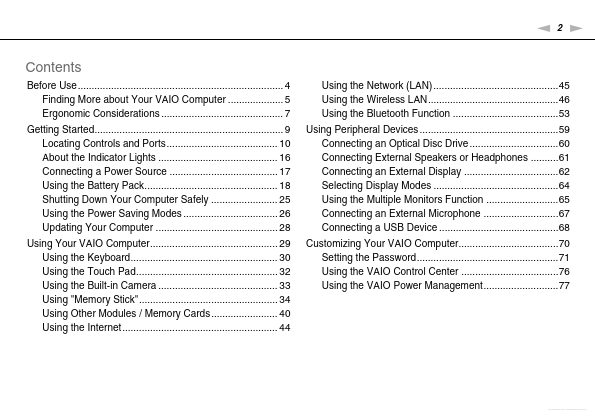
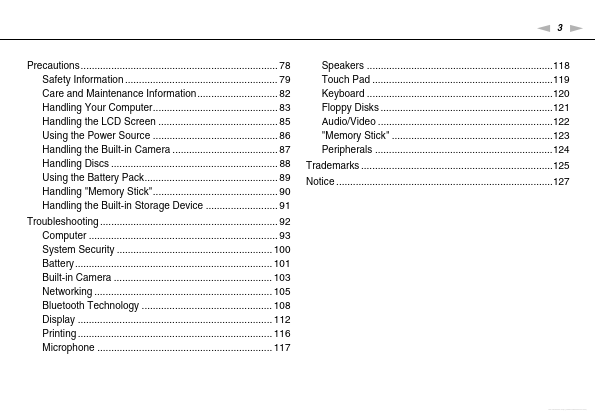
Before Use.......................................................................... 4 Finding More about Your VAIO Computer .................... 5 Ergonomic Considerations ............................................ 7 Getting Started.................................................................... 9 Locating Controls and Ports........................................ 10 About the Indicator Lights ........................................... 16 Connecting a Power Source ....................................... 17 Using the Battery Pack................................................ 18 Shutting Down Your Computer Safely ........................ 25 Using the Power Saving Modes ....

 VPCW12 Datasheet