Datasheet4U Logo Datasheet4U.com

LK204-25 - User Manual

Datasheet Summary

Description

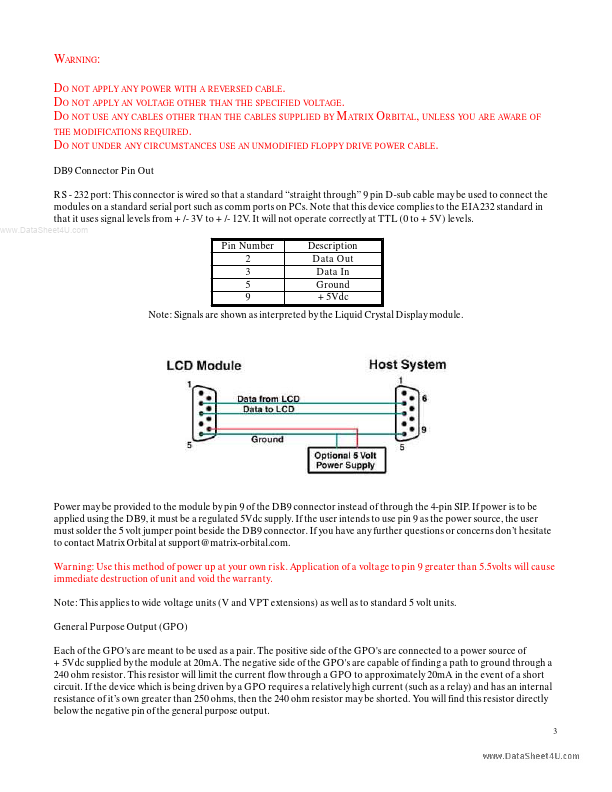
Note: Signals are shown as interpreted by the Liquid Crystal Display module.

Power may be provided to the module by pin 9 of the DB9 connector instead of through the 4-pin SIP.

If power is to be applied using the DB9, it must be a regulated 5Vdc supply.
📥 Download Datasheet

Datasheet preview – LK204-25

Datasheet Details

Part number LK204-25
Manufacturer Matrix
File Size 610.21 KB
Description User Manual
Datasheet download datasheet LK204-25 Datasheet
Additional preview pages of the LK204-25 datasheet.
Other Datasheets by Matrix

Full PDF Text Transcription

Click to expand full text
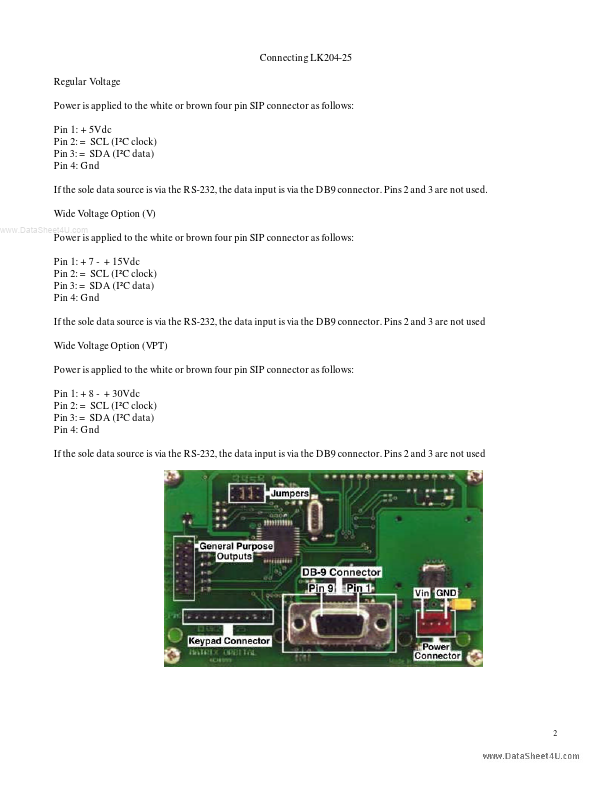
www.DataSheet4U.com LK204-25 User Manual Important: Read page 2 before applying power. Connecting LK204-25 Regular Voltage Power is applied to the white or brown four pin SIP connector as follows: Pin 1: +5Vdc Pin 2: = SCL (I²C clock) Pin 3: = SDA (I²C data) Pin 4: Gnd If the sole data source is via the RS-232, the data input is via the DB9 connector. Pins 2 and 3 are not used. Wide Voltage Option (V) www.DataSheet4U.com Power is applied to the white or brown four pin SIP connector as follows: Pin 1: +7 - +15Vdc Pin 2: = SCL (I²C clock) Pin 3: = SDA (I²C data) Pin 4: Gnd If the sole data source is via the RS-232, the data input is via the DB9 connector.
Published: |