Click to expand full text
e d i u G k c i Qu
www.DataSheet4U.com
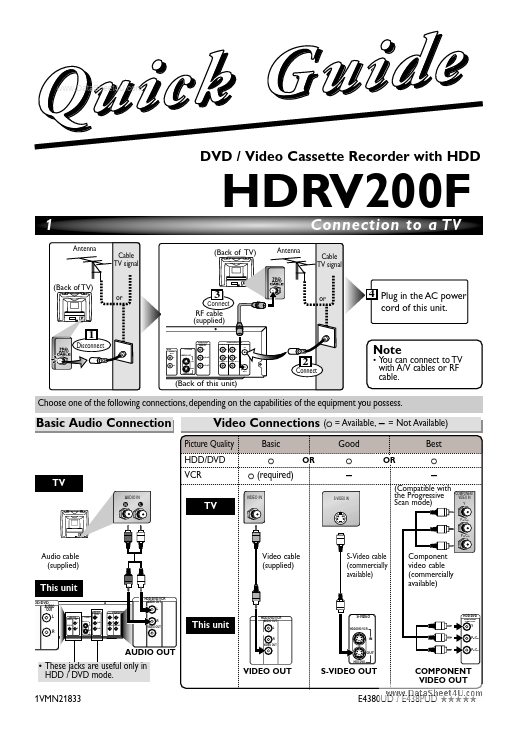
DVD / Video Cassette Recorder with HDD
HDRV200F
1
Antenna Cable TV signal (Back of TV) or (Back of TV) Antenna
Connection to a TV
Cable TV signal
3
Connect RF cable (supplied)
HDD/DVD
COMPONENT VIDEO OUT
or
4 Plug in the AC power cord of this unit.
1
Disconnect
HDD/DVD/VCR
AUDIO IN AUDIO OUT ANTENNA IN
/DVD
AUDIO OUT L
S-VIDEO
Y
L
L
HDD/DVD/VCR
PB/CB IN
R
R
Note
2
Connect
VIDEO IN VIDEO OUT
R OUT
PR/CR
OUT
HDD/DVD
(Back of this unit)
• You can connect to TV with A/V cables or RF cable.
Choose one of the following connections, depending on the capabilities of the equipment you possess.

 HDRV200F Datasheet