Click to expand full text
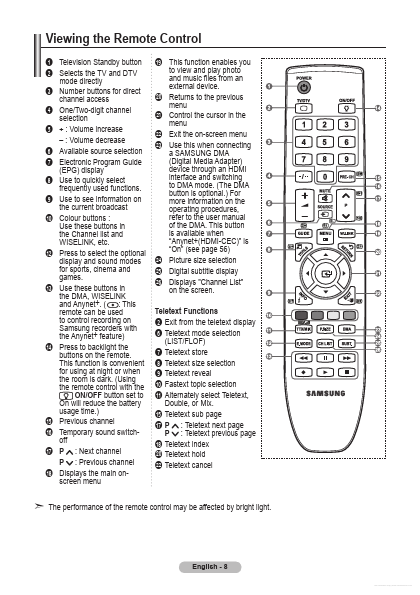
Viewing the Remote Control
Television Standby button Selects the TV and DTV mode directly Number buttons for direct channel access 4 One/Two-digit channel selection 5 + : Volume increase – : Volume decrease 6 � Available source selection 7 Electronic Program Guide (EPG) display 8 Use to quickly select frequently used functions. 9 Use to see information on the current broadcast 0 � Colour buttons : Use these buttons in the Channel list and WISELINK, etc. @ Press to select the optional display and sound modes for sports, cinema and games. # Use these buttons in the DMA, WISELINK and Anynet+. ( : This remote can be used to control recording on Samsung recorders with the Anynet+ feature) $ Press to backlight the buttons on the remote.

 LE37A686M1FX Datasheet