
Datasheet Details
| Part number | Dell-P780-UltraScan |
|---|---|
| Manufacturer | Dell |
| File Size | 571.70 KB |
| Description | Users Guide |
| Datasheet |
 Dell-P780-UltraScan Datasheet Dell-P780-UltraScan Datasheet
|
|
|

Resets the adjustments to the factory settings.
Adjust the picture brightness.
Operate as the adjusting other items.
| Part number | Dell-P780-UltraScan |
|---|---|
| Manufacturer | Dell |
| File Size | 571.70 KB |
| Description | Users Guide |
| Datasheet |
Dell-P780-UltraScan Datasheet
|
|
|
|
Note: Below is a high-fidelity text extraction (approx. 800 characters) for Dell-P780-UltraScan. For precise diagrams, and layout, please refer to the original PDF.
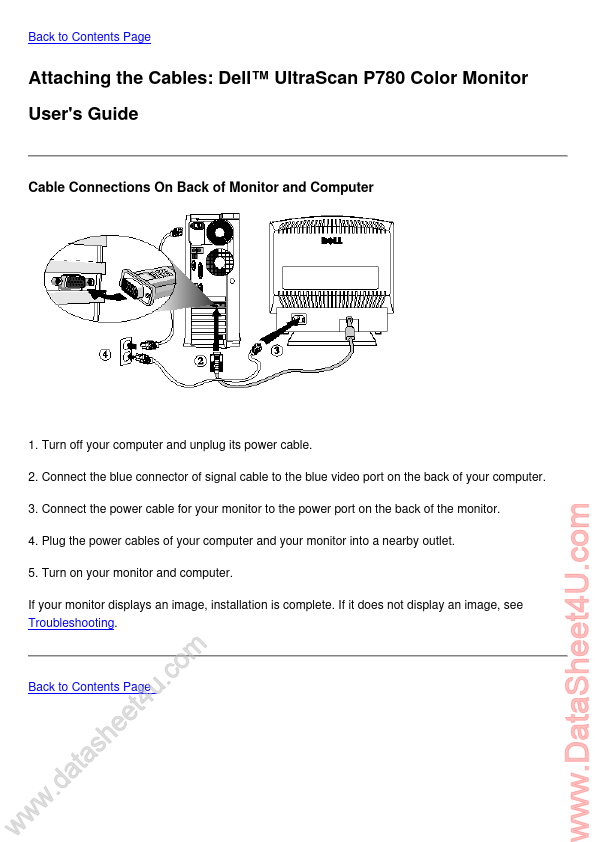
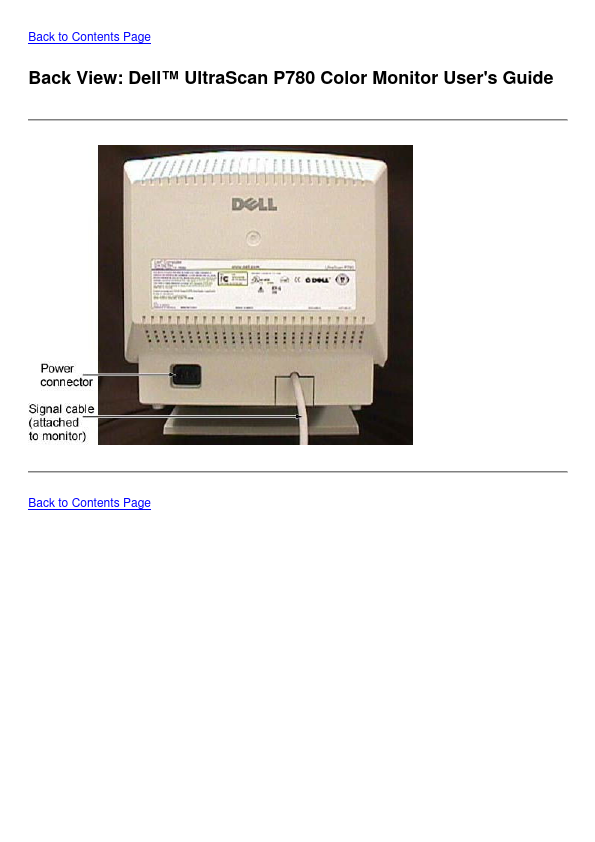
Back to Contents Page Attaching the Cables: Dell™ UltraScan P780 Color Monitor User's Guide Cable Connections On Back of Monitor and Computer 1. Turn off your computer an...
| Part Number | Description |
|---|---|
| Dell1100 | (Dellx100) Service Manual |
| Dell5100 | (Dellx100) Service Manual |
| Dell5100cn | Printer Manual |
| Dell5150 | (Dellx100) Service Manual |